CosmosDBMigration PowerShell Script: Migrate Data with Ease
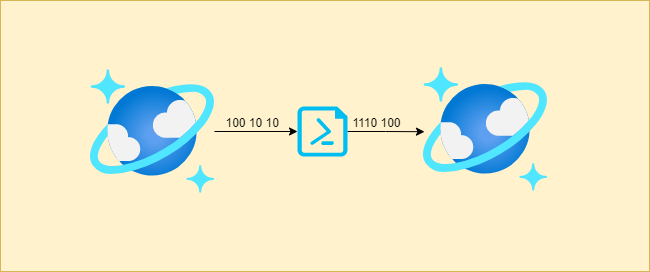
Are you tired of manually migrating data between two Cosmos DB accounts? Worry not! The CosmosDBMigration PowerShell Script is a lifesaver. It is designed specifically to transfer data and procedures between accounts quickly and smoothly without any hassles. 💪
👍 Benefits
The CosmosDBMigration PowerShell Script is a powerful tool that automates the data migration process, saving you time and effort commonly involved in manual migration. Here are some benefits of using the CosmosDBMigration PowerShell Script:
- Automates the process for a smoother experience and consistent data across both accounts.
- Faster execution compared to manual migration.
- Easy-to-use interface, no need to understand complicated coding or software.
- The script can optimize partition memory usage.
- Ensures data integrity during the migration process.
- Auto scales containers for improved performance.
- Enables you to set the throughput value for the collection.
- If you want to back up a database, use deployment slots to migrate to the new environment.
📜 Code
Below is the complete code. For latest changes to the script checkout Github.
📋 Prerequisites
Before you start using the CosmosDBMigration PowerShell Script, ensure that you have the following:
- PowerShell version 5.1 or above. You can download it from the Microsoft official website.
- Azure PowerShell Module.
- DT.exe tool from Microsoft. You can download it from the Microsoft official website.
- An active subscription to Azure.
- Permissions to create new resources in Azure.
💻 Parameters and Switches
The CosmosDBMigration PowerShell Script contains mandatory and optional parameters, including:
- SourceRGName: The name of the resource group of the source account.
- SourceDBAccountName: The Cosmos DB account name of the source account.
- DestinationRGName: The name of the resource group of the destination account.
- DestinationDBAccountName: The Cosmos DB account name of the destination account.
- sleepTime: The time to sleep between container creations. The default value is 60 seconds.
- migratedata: This switch is used to enable data migration.
- provisioned: This switch enables the autoscale throughput provisioning.
- CollectionThroughput: This sets the throughput value for the collection. The default value is 1000.
🚀 How to Use the CosmosDBMigration PowerShell Script
To use the CosmosDBMigration PowerShell Script, follow these steps:
- Step 1: Install Azure PowerShell module if not installed. You can install the Azure PowerShell module from the Microsoft official website.
- Step 2: Install the DT.exe tool to perform the data migration. You can download DT.exe from the Microsoft official website.
- Step 3: Open PowerShell ISE or any other PowerShell editor.
- Step 4: Load the script and execute it by providing the required parameters.
.\CosmosDBMigration.ps1 -SourceRGName "sourceResourceGroupName" -SourceDBAccountName "sourceCosmosDbAccountName" -DestinationRGName "destinationResourceGroupName" -DestinationDBAccountName "destinationCosmosDbAccountName" -sleepTime 120 -migratedata -provisioned -CollectionThroughput 4000- Step 5: If the -migratedata switch is specified, the script will start migrating data from the source to target account.
- Step 6: If the -provisioned switch is specified, the CollectionThroughput parameter is used to set the throughput value for the collection.
🛠 Best Practices
Here are some best practices to ensure a smooth migration process:
- Test the script first in a test environment before running it in production.
- Ensure that the source and target Cosmos DB accounts are running the same version of Cosmos DB API and features.
- Ensure that the target account has enough capacity and throughput to handle the data being transferred.
- Monitor the migration process to ensure it completes successfully without any issues.
💡 Conclusion
The CosmosDBMigration PowerShell Script is an essential tool that simplifies the process of migrating data between two Cosmos DB accounts. With a user-friendly interface, seamless data transfer, and hassle-free execution, this script makes moving data an easy and straightforward task. Ensure you follow the best practices and necessary prerequisites to ensure a successful migration. Try it today and experience a fast and easy data migration process like never before! 😃